
If you have ever watched television through an internet connection rather than a traditional aerial or satellite dish, you may already be familiar with the idea behind IPTV. The technology has changed the way people access television, giving viewers more flexibility over where and how they watch their favorite programmed.
But what exactly is IPTV, and how does it work? For beginners in the UK, the terminology can sometimes be confusing. IPTV apps, streaming devices, internet speeds and subscriptions are often mentioned together, even though each has a different purpose.
In this guide, we will explain IPTV in simple terms, look at how programmed reach your screen, and cover the equipment, internet connection and other things you need to understand before getting started.
What Is IPTV?
IPTV stands for Internet Protocol Television. It is a way of delivering television content through an internet connection instead of relying solely on traditional broadcast methods such as terrestrial television or satellite signals.
With IPTV, compatible devices can receive television streams over an internet network. Depending on the service, viewers may be able to watch live television, catch up on previously broadcast programmed or access on-demand films and shows.
For example, someone in the UK might watch a programmed through a television streaming app, use a compatible streaming device connected to their TV, or access an online television service through a supported device.
The important point is that IPTV describes the technology used to deliver content. It does not automatically refer to a particular app, channel package or subscription service.
How Does IPTV Work?
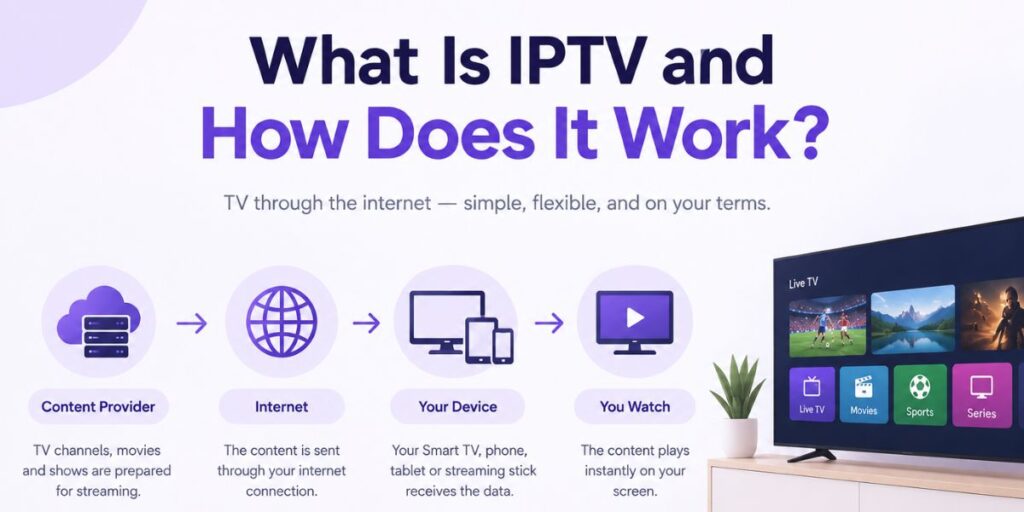
IPTV works by sending video and audio data over an internet connection. Instead of receiving a programme only through an aerial or satellite dish, your device receives a digital stream from the provider’s system.
Although the technical process involves several steps, the basic idea is straightforward.
1. The Content Is Prepared for Streaming
A broadcaster or content provider prepares television programmes, films or live events for digital delivery. The content is encoded into a format that compatible devices can play.
For live television, this process happens while a programme or event is being broadcast. For on-demand content, the video is stored so that viewers can request it when they want to watch.
2. The Stream Travels Through the Internet
When you select a programme, the service sends the relevant video stream through its network to your device. The stream is delivered in small pieces, allowing playback to begin without downloading an entire programme first.
The quality you experience can depend on several factors, including your internet connection, the provider’s infrastructure, the device you use and the video quality being delivered.
3. Your Device Plays the Content
Your Smart TV, streaming stick, mobile phone or another compatible device receives the stream and displays the programme on your screen.
Depending on the service, you might select a live channel, open a catch-up programme or choose a film from an on-demand library. A compatible app or built-in player provides the controls you use to browse and play the content.
In simple terms, IPTV connects the content source, an internet network and a compatible device to deliver television over the internet.
What Is the Difference Between IPTV and Traditional Television?
Traditional television and IPTV can both provide access to programmes, but they deliver content in different ways.
Traditional terrestrial television in the UK generally uses an aerial to receive broadcast signals. Satellite television uses a satellite dish, while cable services use a cable network. IPTV delivers content through internet-based networks.
Here is a simple comparison:
- Traditional aerial television: Receives broadcast signals through suitable aerial and television equipment.
- Satellite television: Receives television signals through a satellite dish and compatible receiver.
- IPTV: Delivers television streams over an internet connection to a compatible device.
- Online streaming apps: Provide video through the internet, although not every streaming service is technically IPTV in the narrower, managed-network sense.
These options are not necessarily competitors in every situation. Many households use more than one method, such as watching terrestrial channels on their television while using internet apps for films, catch-up programmes and other content.
What Do You Need to Use IPTV in the UK?
The equipment required depends on the service and the way you plan to watch. However, most internet-based television setups need a few basic things.
A Reliable Internet Connection
Your internet connection carries the video stream from the service to your device. If the connection is slow, unstable or heavily congested, you may experience buffering, reduced picture quality or interruptions.
A stable connection is often more important than simply paying for the highest advertised speed. Your household’s internet usage, Wi-Fi coverage and the number of devices streaming at the same time can all affect playback.
A Compatible Television or Device
Some Smart TVs support streaming apps directly, so you may not need additional hardware. Other televisions can use a compatible streaming stick, set-top box or media player connected through HDMI.
You can also use supported computers, tablets or smartphones, depending on the service. Before installing anything, check the provider’s compatibility information and your device’s available features.
A Compatible App or Player
An app provides the interface through which you browse and play content. Some services have their own official apps, while others may support compatible media players.
It is important to understand that an IPTV player does not necessarily provide television channels by itself. Some players only play content from a playlist or service that the user supplies separately.
Access to a Content Service
If you want to watch subscription-based television, you may need an account or subscription from a provider that has the appropriate rights to supply the content. The available channels and features depend on the service you use.
Before paying, check what is included, which devices are supported, how billing works and whether the provider clearly explains its terms.
Can You Watch IPTV on a Smart TV?
Yes, internet-delivered television can be watched on many Smart TVs, provided the service supports the television’s operating system and model.
Some Smart TVs have compatible apps available through their official app stores. Others may require an external streaming device if the desired app is not supported.
Before setting up a service, check three things: whether your television supports the required app, whether your internet connection is stable enough for streaming, and whether the service works with your particular model.
If you are using a television that does not support the required software, a compatible streaming device may provide another way to access internet-based content.
Can You Use IPTV on an Amazon Fire TV Stick?
A compatible Amazon Fire TV Stick can connect a television to internet streaming services. It plugs into an HDMI port and connects to your home network, allowing you to install and use supported apps.
However, compatibility varies. Not every IPTV-related app is available on every device, and an app’s presence does not mean that it provides channels or has permission to distribute them.
If you want to understand the device-specific setup, read our guide to Best IPTV for Firestick in the UK. It covers the Firestick angle in more detail without replacing this article’s general explanation of the technology.
What Internet Speed Do You Need for IPTV?
There is no single internet speed that guarantees perfect playback on every service. The amount of bandwidth needed depends on the video resolution, stream quality, network stability and how many people are using the connection at once.
As a general starting point, standard-definition video needs less bandwidth than HD or 4K streaming. If several people in your home are watching videos, gaming or downloading large files simultaneously, your available bandwidth may be shared between those activities.
For a better experience, consider the following:
- Use a reliable broadband connection.
- Place your router where your streaming device can receive a strong Wi-Fi signal.
- If possible, use Ethernet for devices that support a wired connection.
- Pause large downloads if streaming becomes unstable.
- Test playback at the resolution you actually intend to watch.
If your internet speed looks sufficient but the stream still buffers, the cause may be weak Wi-Fi, network congestion, the streaming device or the service itself. Increasing your broadband speed is not always the only solution.
What Is the Difference Between an IPTV App and an IPTV Subscription?
These two terms are often confused, particularly by people setting up internet television for the first time.
An IPTV app or player is the software used to open, organise or play compatible streams. Depending on the app, it may include features such as channel categories, favourites, an electronic programme guide or playback controls.
An IPTV subscription or content service is the service that provides access to particular channels or programmes under its terms. It may supply its own app, or it may support a compatible third-party player.
Installing a player does not automatically give you access to live channels. You still need a legitimate source of content, unless the app itself provides authorised content as part of its offering.
Understanding this distinction can help you avoid paying for an app when what you actually need is a content service, or purchasing a service that does not support your device.
Is IPTV Legal in the UK?
IPTV technology itself is not illegal. The important question is whether the television content is being distributed with the necessary permissions.
Some services have the rights to provide the programmes and channels they offer. Others may distribute copyrighted content without the required authorisation. The fact that a stream works, or that an app is available to install, does not prove that the content is licensed.
Before signing up, look for clear information about the provider, its terms, payment arrangements and the content it is authorised to supply. Be cautious of services making unrealistic promises or offering access to extensive premium content without explaining their rights.
Using authorised services and respecting copyright law is the safest approach.
What Should You Check Before Using an IPTV Service?
Once you understand the basics, a few simple checks can help you make a more informed decision.
Device compatibility: Confirm that the service works with your television, streaming device or other equipment.
Content availability: Check the actual channels and programmes included rather than relying on broad advertising claims.
Streaming performance: Look for clear information about picture quality, supported resolutions and any known device limitations.
Pricing and renewal terms: Understand the total cost, subscription period, automatic renewal arrangements and cancellation policy before paying.
Customer support: Check how the provider can be contacted and what assistance is available if setup or playback problems occur.
Content rights: Make sure the service is authorised to provide the content you intend to watch.
If you are researching subscription options after learning the basics, our IPTV Subscription UK guide explains the factors viewers can compare before subscribing.
Final Thoughts
IPTV is a way of delivering television content through internet-based networks. It can support live television and, depending on the service, catch-up programmes and on-demand video. To use it, you generally need a suitable internet connection, a compatible device, appropriate software and access to a legitimate content source.
The technology may sound complicated at first, but the basic process is simple: you choose content, the service sends a stream over the internet, and your device plays it. Once you understand the difference between the technology, the app and the content provider, it becomes much easier to understand how an IPTV setup works.
Take time to check compatibility, connection quality, subscription terms and content rights before choosing a service. These practical checks are more useful than relying on advertising claims alone.
Frequently Asked Questions
1. What does IPTV stand for?
IPTV stands for Internet Protocol Television. It describes the delivery of television content over internet-based networks rather than relying exclusively on traditional terrestrial or satellite broadcasting.
2. Does IPTV need an aerial or satellite dish?
IPTV generally uses an internet connection to deliver content, so it does not require a television aerial or satellite dish for that stream. You still need a compatible device and access to the relevant service.
3. Can I watch IPTV without a Smart TV?
Yes. Depending on the service, you may be able to use a compatible streaming stick, set-top box, computer, tablet or smartphone. Check the service’s supported devices before setting it up.
4. Does an IPTV app include channels automatically?
Not necessarily. Some apps provide their own authorised content, while other IPTV players only play compatible streams or playlists supplied separately. Check what the app actually includes before purchasing it.
5. Does IPTV work over Wi-Fi?
Yes, many internet-based television services work over Wi-Fi. Playback quality depends on signal strength, network congestion, available bandwidth and the service’s own performance. A wired connection may help if Wi-Fi is unreliable.
6. Is IPTV the same as Netflix or other streaming apps?
They use internet connections to deliver video, but the terms are not always interchangeable. IPTV often refers to television delivered through internet protocol networks, including live TV services, while platforms such as Netflix are primarily associated with on-demand streaming.
7. Is every IPTV service legal in the UK?
No. The technology is legal, but a service must have the necessary rights to distribute the content it offers. Users should check the provider’s legitimacy and avoid services that appear to distribute copyrighted material without authorisation.
8. Can IPTV replace traditional television?
It can replace some viewing methods for people whose preferred channels and programmes are available through an authorised internet service. Whether it meets your needs depends on content availability, internet reliability, device compatibility and personal preferences.